CLI Reference
Audience: Customer — this page documents all AI-Pooler CLI commands and options.
Complete reference for all AI-Pooler CLI commands.
npx @rulecatch/ai-pooler [command] [options]
Commands
init
Interactive setup. Validates API key, installs hooks, creates config. Supports full mode (with API key) and monitor-only mode (free, no account needed).
npx @rulecatch/ai-pooler init [options]
| Option | Description |
|---|---|
--api-key=KEY |
API key (prefix: dc_) |
--monitor-only |
Skip API key — monitor mode only (no dashboard, no data sent) |
--region=us|eu |
Data region |
--encryption-key=PWD |
Encryption password (min 8 chars) |
--project-id=NAME |
Override auto-detected project name (from git remote or cwd) |
--batch-size=N |
Events before auto-flush (default: 20) |
Without flags, the interactive prompt offers three options:
- Yes, I have an API key — full setup with dashboard integration
- No, I need to create an account — opens signup in browser
- No, just let me try the monitor first — monitor-only mode
uninstall
Remove all Rulecatch files, hooks, and configuration. Alias: remove.
npx @rulecatch/ai-pooler uninstall
status
Check installation health: config, hooks, buffer, session token, backpressure.
npx @rulecatch/ai-pooler status
Output includes:
- Collection status (Active / Paused)
- Config validation
- Hook and flush script presence
- Hook registration in settings.json
- Buffer event count
- Session token validity
- Backpressure health
flush
Force send all buffered events to the API.
npx @rulecatch/ai-pooler flush
Runs the flush script with --force flag, bypassing batch size threshold. Reports success/failure and remaining event count.
logs
Show flush or hook activity logs.
npx @rulecatch/ai-pooler logs [options]
| Option | Description | Default |
|---|---|---|
--lines=N |
Number of lines to show | 30 |
--source=flush|hook |
Which log to display | flush |
Flush log (~/.claude/rulecatch/flush.log): Records batch sends, errors, backpressure events.
Hook log (/tmp/rulecatch-hook.log): Records individual hook fires and event captures.
check
View recent rule violations from the API.
npx @rulecatch/ai-pooler check [options]
| Option | Description | Default |
|---|---|---|
--period=PERIOD |
Time window: 1h, 12h, 24h, 7d |
24h |
--quiet / -q |
Only output the summary line (for scripting) | |
--format=FORMAT |
Output format: summary, json |
summary |
Example output:
Rulecatch Violations (Last 24 hours)

  Total:    5
  Errors:   2
  Warnings: 3

  2 errors and 3 warnings in the last 24 hours
Scripting usage:
npx @rulecatch/ai-pooler check --quiet --format summary
# Output: "2 errors and 3 warnings in the last 24 hours"
Requires a valid API key (not available in monitor-only mode).
config
View or update configuration.
npx @rulecatch/ai-pooler config [options]
| Option | Description |
|---|---|
--region=us|eu |
Change data region |
--batch-size=N |
Change batch threshold |
--show-key |
Display your encryption key |
Without options, displays current config values.
monitor / live
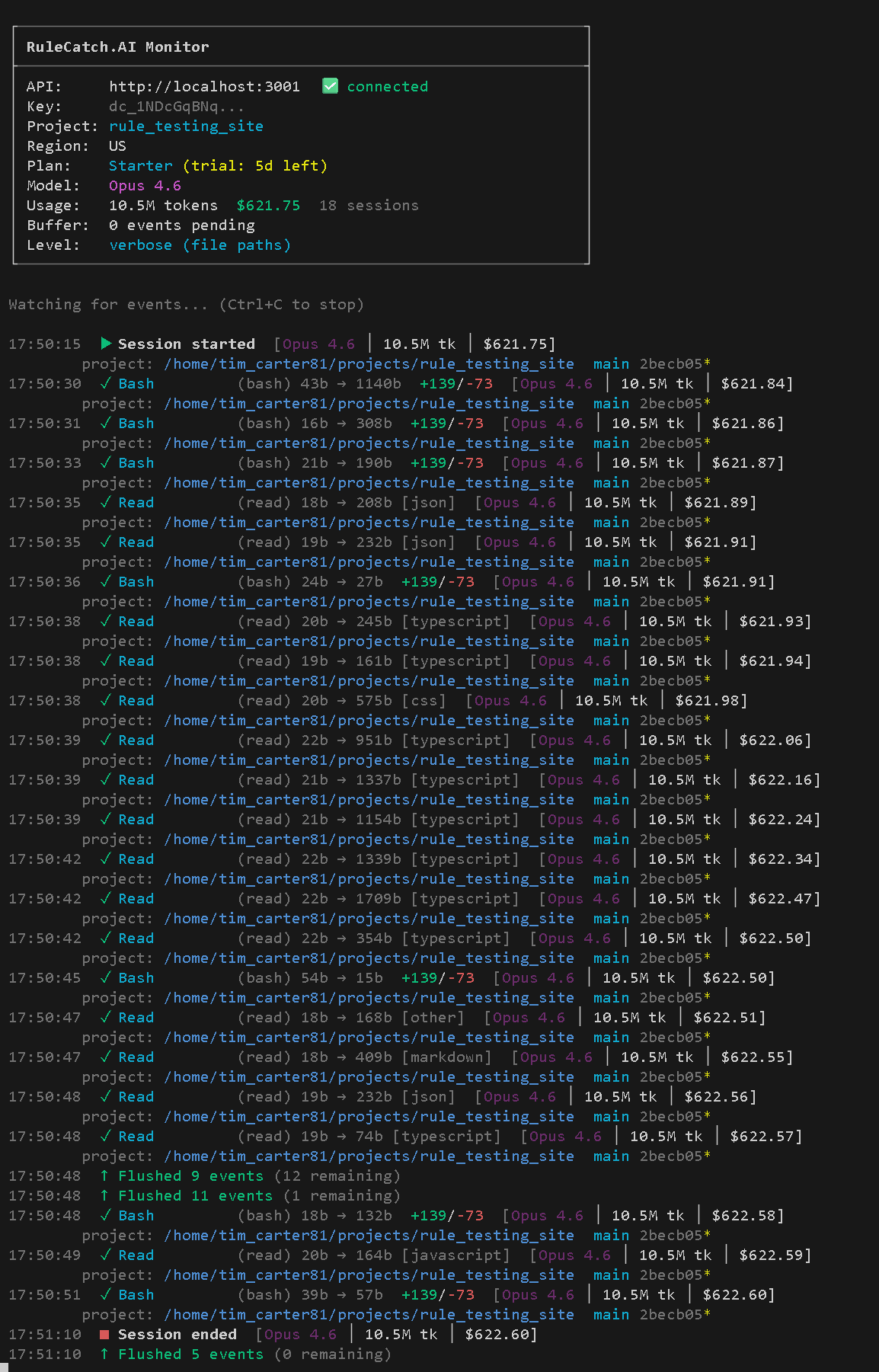
Real-time event stream. Watches the buffer directory and flush log for activity.
npx @rulecatch/ai-pooler monitor [options]
npx @rulecatch/ai-pooler live [options]    # alias
| Option | Description |
|---|---|
-v / --verbose |
Show file paths, git context, line changes |
-vv / --debug |
Full JSON event dump |
--show-prompt |
Include user prompt previews (length + first 80 chars) |
--no-api-key |
Force monitor-only mode (auto-runs init if needed) |
Output Levels
Compact (default):
10:30:15  ✓ Write    src/app/page.tsx (write) 1500b
10:30:18  ✓ Read     utils/db.ts      200b
Verbose (-v):
10:30:15  ✓ Write        (write) 1500b → 200b [typescript] +25/-3
         path: /home/user/project/src/app/page.tsx
         project: /home/user/project  main a1b2c3d*
Debug (-vv):
10:30:15  ✓ Write (write)
         {
           "type": "tool_call",
           "toolName": "Write",
           "toolSuccess": true,
           ...full JSON dump...
         }
The monitor also shows:
- API connectivity and subscription status
- Current plan and trial info
- Running token and cost counters
- Model information
- Flush events (when buffer files are sent)
- Session start/end events
- Project path and git context for every event
backpressure / bp
Show detailed backpressure and throttling status.
npx @rulecatch/ai-pooler backpressure [options]
npx @rulecatch/ai-pooler bp [options]     # alias
| Option | Description |
|---|---|
--reset=true |
Reset backpressure state (clears backoff) |
Output includes:
- Health status (Healthy / Backing Off / Circuit Breaker OPEN)
- Consecutive failure count
- Backoff level (0-10)
- Next retry timing
- Last success time
- Pending event count
- Last server capacity response
reactivate
Resume data collection after subscription renewal.
npx @rulecatch/ai-pooler reactivate
- Removes the
.pausedfile - Removes old session file (forces re-auth)
- Attempts to acquire a new session token
- Reports subscription status
If subscription is still inactive, displays the billing URL and instructions.
help
Show help text with all commands and options.
npx @rulecatch/ai-pooler help
npx @rulecatch/ai-pooler --help
npx @rulecatch/ai-pooler -h
See Also
- Installation — Setup walkthrough
- Hooks — What hooks capture
- Backpressure — Flow control details
- Encryption — Encryption key management